
At Hilight we care deeply about supporting your school and district culture. We are now offering a version of Hilight where the main focus is on the recipients and content of the hilights and less on the sender. When your district turns this setting on, the name of the person who sent a hilight is not visible to most staff on shared feeds (like the District Feed and School Feed), so that the emphasis is on who is being highlighted and for what!
However, the sender will still visible to:
- The sender themselves
- The recipient(s) of that specific hilight
- School Admins at the recipient's school
- District Admins in the district
The recipient's name is always visible to everyone who can see the hilight. This setting only ever affects whether the sender's name shows up.
Nothing else changes. Sending, receiving, celebrating, bookmarking, and reward points all work exactly the same as before.
This is a district-wide setting managed by your Hilight administrator. It's off by default, so if your district hasn't turned it on, you won't notice any change.
Where you'll see this
Feeds (District, School, Student, My Feed)
On hilights where the sender is not visible, you will just see the recipients names.
If you're a School Admin, you may notice the District Feed looks a little different depending on the card: you'll see real sender names on hilights involving your own school, and blanked names on hilights from other schools. That's expected. You have visibility into recognition happening at your school, the same as any staff member has for their own.
Notifications
Notification text isn't affected. Since notifications go to the recipient, and recipients can always see who sent them a hilight, this works the same as it always has.
Bookmarks
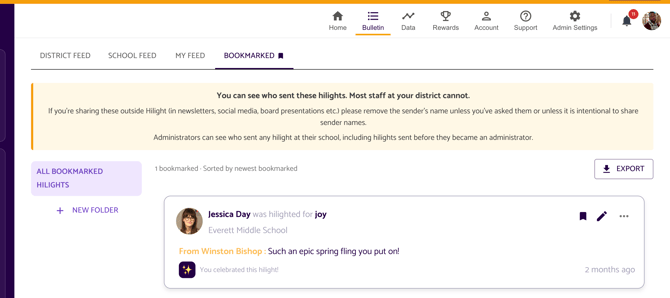
Bookmarks follow the same visibility rules as the feeds. If you're a School Admin or District Admin, you'll see a reminder banner on your Bookmarks page:
You can see who sent these hilights. Most staff at your district cannot. If you're sharing these outside Hilight (in newsletters, social media, board presentations, etc.) please remove the sender's name unless you've asked them or it's intentional to share sender names.
Monitor Display
Sender names are always hidden on Monitor Display, for everyone, regardless of this setting. Monitor Display is public by nature (anyone walking by can see it), so sender identity never shows there.
A few things to know
- Promotions and role changes: Sender visibility is based on your current permissions, not what your permissions were when a hilight was sent. If you're promoted to School Admin or District Admin, you'll immediately be able to see sender names on past hilights at your school or district too, not just new ones going forward. The reverse is also true: if your admin access is removed, you'll no longer be able to see sender names.
- Multiple schools: If you're a School Admin at more than one school, you can see sender names for hilights involving any of your assigned schools.
- Message content: This setting only hides the sender name field. It doesn't review or restrict what people write in their hilight message or attach as a photo, so a message could still reference who sent it.
FAQ
Does this change who can send or receive hilights?
No. Sending, receiving, and every feed's membership rules stay exactly the same. This setting only affects whether the sender's name is shown.
Can I still thank someone who recognized me?
Yes! If you're the recipient of a hilight, you'll always be able to see who sent it and reply directly, no matter what this setting is.
I'm a School Admin. Why do I see the sender on some cards and not others?
You can see sender names for hilights involving your own school. For hilights at other schools, you'll see them the way your staff do, without a name attached.
Have any questions or need help? Reach out to us at support@hilightedu.com and we'd be happy to help!